
PNNL

  • About
  • News & Media
  • Careers
  • Events
  • Research
    • Scientific Discovery
      • Autonomous Science
      • Biology
        • Chemical Biology
        • Computational Biology
        • Ecosystem Science
        • Human Health
          • Cancer Biology
          • Exposure Science & Pathogen Biology
        • Integrative Omics
          • Advanced Metabolomics
          • Chemical Biology
          • Mass Spectrometry-Based Measurement Technologies
          • Spatial and Single-Cell Proteomics
          • Structural Biology
        • Microbiome Science
          • Biofuels & Bioproducts
          • Human Microbiome
          • Soil Microbiome
          • Synthetic Biology
        • Predictive Phenomics
      • Chemistry
        • Computational Chemistry
        • Chemical Separations
        • Chemical Physics
        • Catalysis
      • Earth & Coastal Sciences
        • Global Change
        • Atmospheric Science
          • Atmospheric Aerosols
          • Human-Earth System Interactions
          • Modeling Earth Systems
        • Coastal Science
        • Ecosystem Science
        • Subsurface Science
        • Terrestrial Aquatics
      • Materials Sciences
        • Materials in Extreme Environments
        • Nondestructive Examination
        • Precision Materials by Design
        • Science of Interfaces
        • Smart Advanced Manufacturing
          • Cold Spray
          • Friction Stir Welding & Processing
          • ShAPE
      • Nuclear & Particle Physics
        • Dark Matter
        • Fusion Energy Science
        • Neutrino Physics
      • Quantum Information Sciences
    • Energy Resiliency
      • Electric Grid Modernization
        • Emergency Response
        • Grid Analytics
          • AGM Program
          • Tools and Capabilities
        • Grid Architecture
        • Grid Cybersecurity
        • Grid Energy Storage
        • Transmission
        • Distribution
      • Energy Efficiency
        • Appliance and Equipment Standards
        • Building Energy Codes
        • Building Technologies
          • Advanced Building Controls
          • Advanced Lighting
          • Building-Grid Integration
        • Commercial Buildings
        • Federal Buildings
          • Federal Performance Optimization
          • Resilience and Security
        • Residential Buildings
          • Building America Solution Center
          • Energy Efficient Technology Integration
          • Home Energy Score
        • Energy Efficient Technology Integration
      • Energy Storage
        • Electrochemical Energy Storage
        • Flexible Loads and Generation
        • Grid Integration, Controls, and Architecture
        • Regulation, Policy, and Valuation
        • Science Supporting Energy Storage
        • Chemical Energy Storage
      • Environmental Management
        • Waste Processing
        • Radiation Measurement
        • Environmental Remediation
      • Fossil Energy
        • Subsurface Energy Systems
        • Advanced Hydrocarbon Conversion
      • Nuclear Energy
        • Fuel Cycle Research
        • Advanced Reactors
        • Reactor Operations
        • Reactor Licensing
        • Nondestructive Examination
      • Renewable Energy
        • Solar Energy
        • Wind Energy
          • Wind Resource Characterization
          • Wildlife and Wind
          • Wind Systems Integration
          • Wind Data Management
          • Distributed Wind
        • Marine Energy
          • Environmental Monitoring for Marine Energy
          • Marine Biofouling and Corrosion
          • Marine Energy Resource Characterization
          • Testing for Marine Energy
          • The Blue Economy
        • Hydropower
          • Environmental Performance of Hydropower
          • Hydropower Cybersecurity and Digitalization
          • Hydropower and the Electric Grid
          • Materials Science for Hydropower
          • Pumped Storage Hydropower
          • Water + Hydropower Planning
        • Grid Integration of Renewable Energy
        • Geothermal Energy
      • Transportation
        • Bioenergy Technologies
          • Algal Biofuels
          • Aviation Biofuels
          • Waste-to-Energy and Products
        • Hydrogen & Fuel Cells
        • Vehicle Technologies
          • Emission Control
          • Energy-Efficient Mobility Systems
          • Lightweight Materials
          • Vehicle Electrification
          • Vehicle Grid Integration
    • National Security
      • Chemical & Biothreat Signatures
        • Contraband Detection
        • Pathogen Science & Detection
        • Explosives Detection
        • Threat-Agnostic Biodefense
      • Cybersecurity
        • Discovery and Insight
        • Proactive Defense
        • Trusted Systems
      • Nuclear Material Science
      • Nuclear Nonproliferation
        • Radiological & Nuclear Detection
        • Nuclear Forensics
        • Ultra-Sensitive Nuclear Measurements
        • Nuclear Explosion Monitoring
        • Global Nuclear & Radiological Security
      • Stakeholder Engagement
        • Disaster Recovery
        • Global Collaborations
        • Legislative and Regulatory Analysis
        • Technical Training
      • Systems Integration & Deployment
        • Additive Manufacturing
        • Deployed Technologies
        • Rapid Prototyping
        • Systems Engineering
      • Threat Analysis
        • Advanced Wireless Security
          • 5G Security
          • RF Signal Detection & Exploitation
        • Border Security
        • Internet of Things
        • Maritime Security
        • Millimeter Wave
        • Mission Risk and Resilience
    • Data Science & Computing
      • Artificial Intelligence
      • Graph and Data Analytics
      • Software Engineering
      • Computational Mathematics & Statistics
      • Future Computing Technologies
        • Adaptive Autonomous Systems
    • Lab Objectives
    • Publications & Reports
    • Featured Research
  • People
    • Inventors
    • Lab Leadership
    • Lab Fellows
    • Staff Accomplishments
  • Partner with PNNL
    • Education
      • Undergraduate Students
      • Graduate Students
      • Post-graduate Students
      • University Faculty
      • University Partnerships
      • K-12 Educators and Students
      • STEM Education
        • STEM Workforce Development
        • STEM Outreach
      • Internships
    • Community
      • Philanthropy
      • Volunteering
    • Industry
      • Why Partner with PNNL
      • Explore Types of Engagement
      • How to Partner with Us
      • Available Technologies
      • Procurement
      • Technology Ombuds
  • Facilities & Centers
    • All Facilities
      • Atmospheric Radiation Measurement User Facility
      • Electricity Infrastructure Operations Center
      • Energy Sciences Center
      • Environmental Molecular Sciences Laboratory
      • Grid Storage Launchpad
      • Institute for Integrated Catalysis
      • Interdiction Technology and Integration Laboratory
      • PNNL Portland Research Center
      • PNNL-Seattle
      • PNNL-Sequim (Marine and Coastal Research)
      • Radiochemical Processing Laboratory
      • Shallow Underground Laboratory

Advanced Metering Best Practices

  • Metering 101
  • Program Objectives
    • Advanced Metering System Costs and Savings Potential
    • Common Metering Challenges
  • Electricity Metering
  • Water Metering
  • Connectivity Troubleshooting
    • Pre-Troubleshooting Checklists
    • Decision Trees
  • Glossary

Breadcrumb

  1. Home
  2. Projects
  3. Advanced Metering Best Practices

Connectivity Troubleshooting: Decision Trees

The first decision tree covers power issues and the second tree covers network connectivity issues. The decision trees assume that you know the meter location and have the appropriate authorization to access and perform basic testing and servicing on the meter. The trees indicate steps where it may be necessary to call an authorized electrician or IT network administrator for further assistance. 

Note: This troubleshooting guide provides general recommendations for troubleshooting disconnected meters. Always follow your facility’s safety policies and consult the relevant standard operating procedures (SOP) before proceeding with any troubleshooting steps in this guide. If in doubt about whether you have the authorization or knowledge to safely conduct an action, do not proceed. Instead, consult with your manager and the relevant safety personnel about appropriate next steps.

Power Troubleshooting Decision Tree

Download the power troubleshooting decision tree (.pdf).
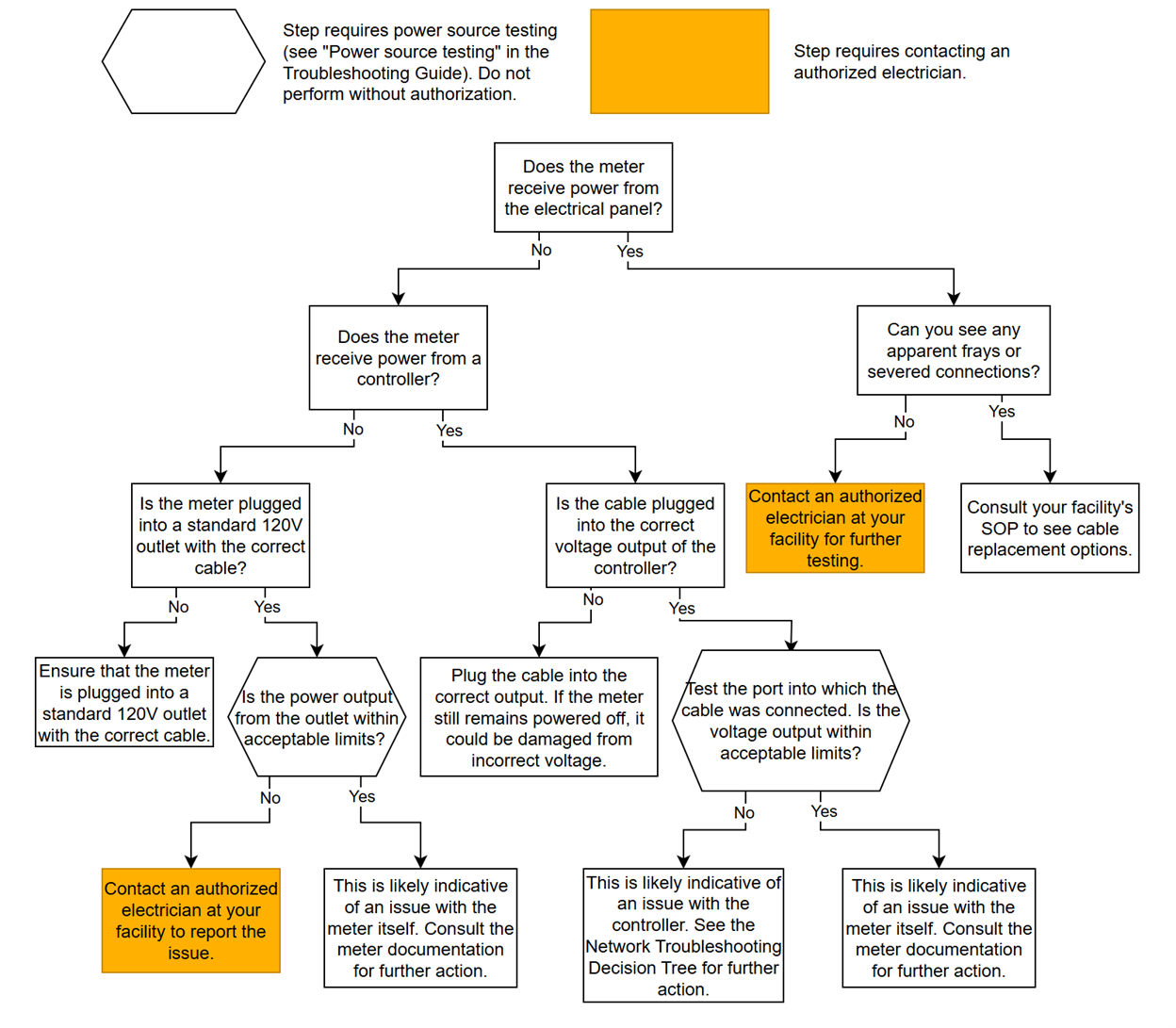
Power troubleshooting decision tree

Network Troubleshooting Decision Tree

Part 1 of 3

Download the network troubleshooting decision tree (.pdf).
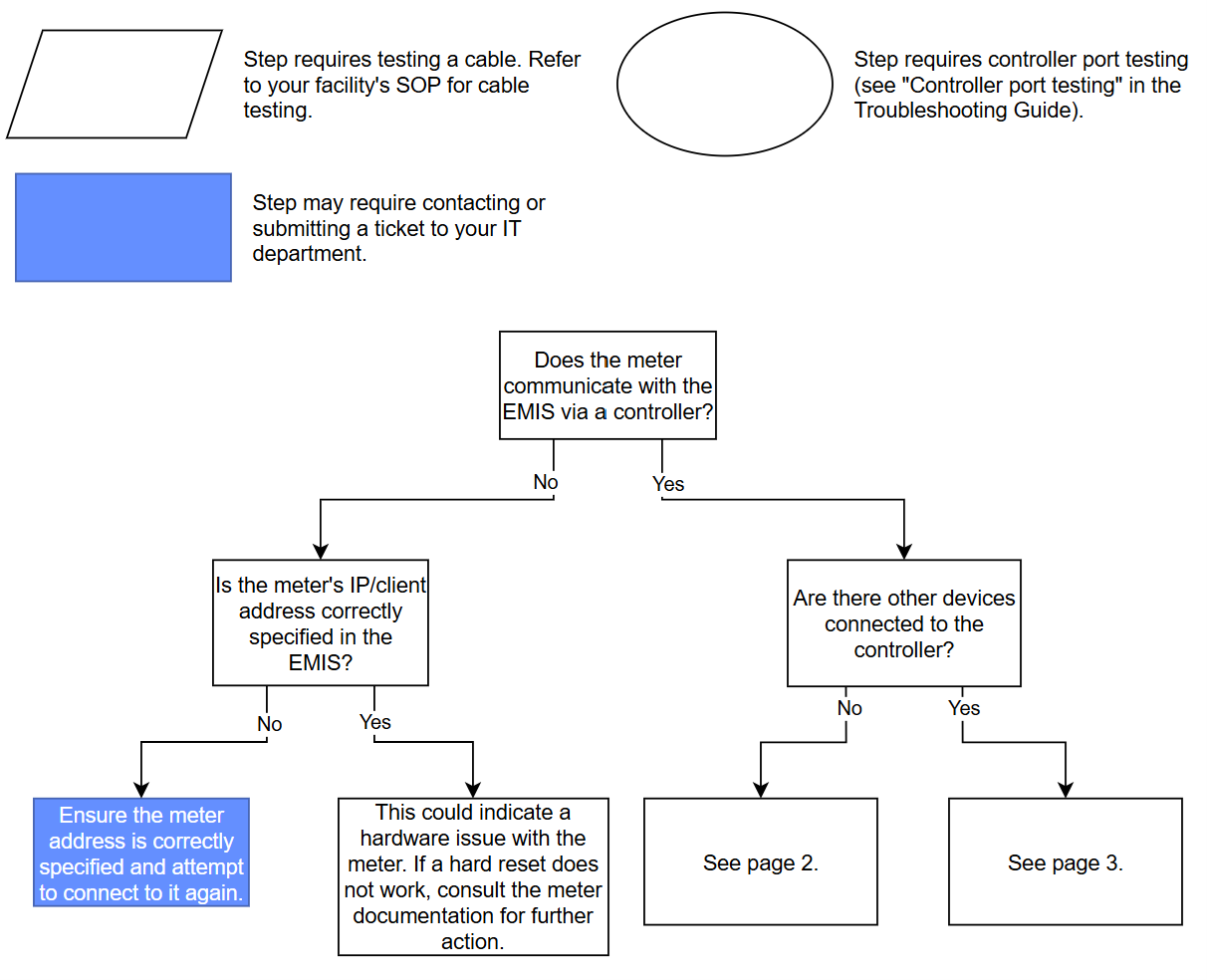
Network troubleshooting guide 1 of 3

Part 2 of 3

Continue with this decision tree if there are no other devices connected to the controller.

Download the network troubleshooting decision tree (.pdf).
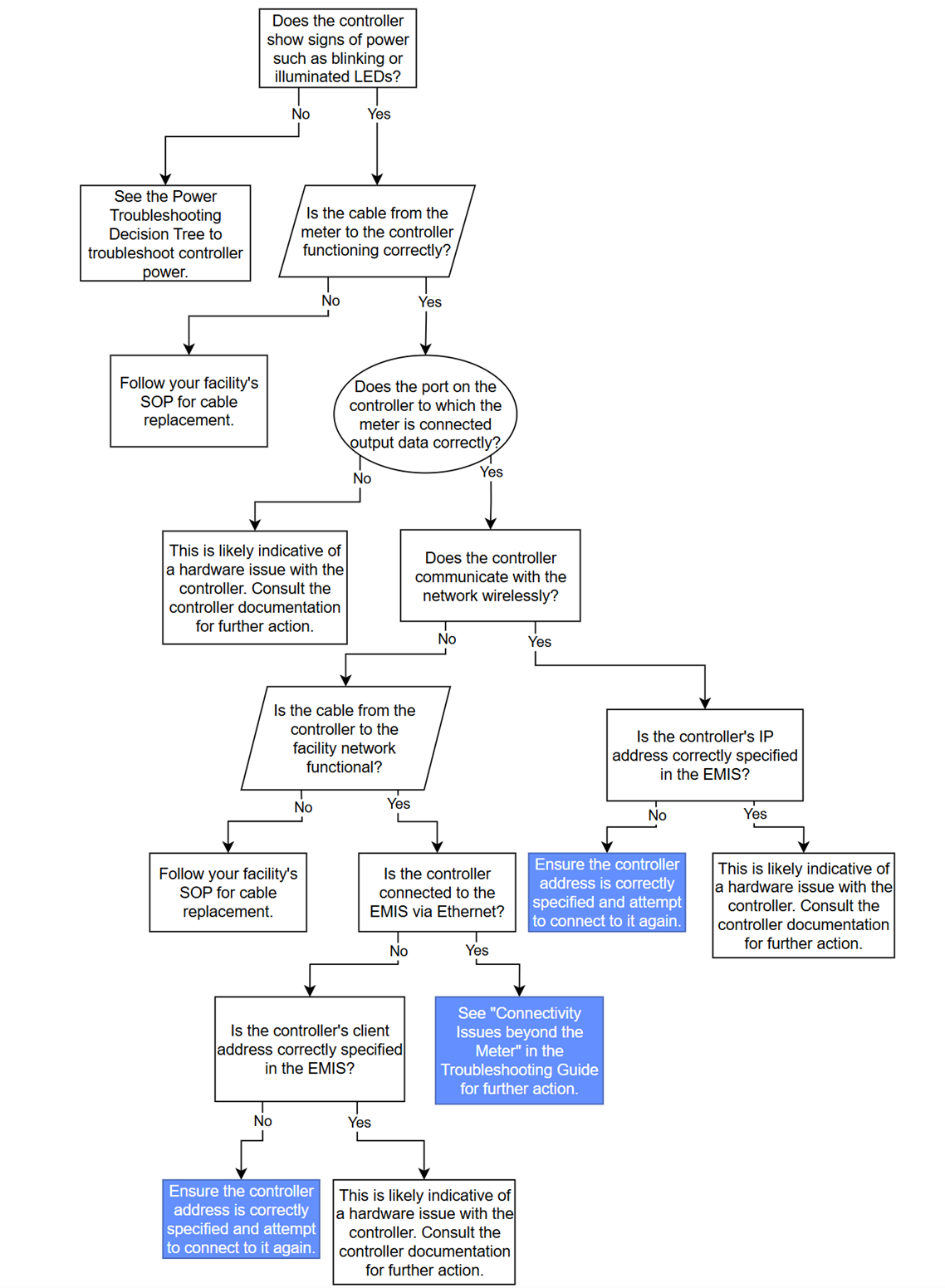
Network troubleshooting guide 2 of 3

Part 3 of 3

Continue with this decision tree if there are other devices connected to the controller.

Download the network troubleshooting decision tree (.pdf).
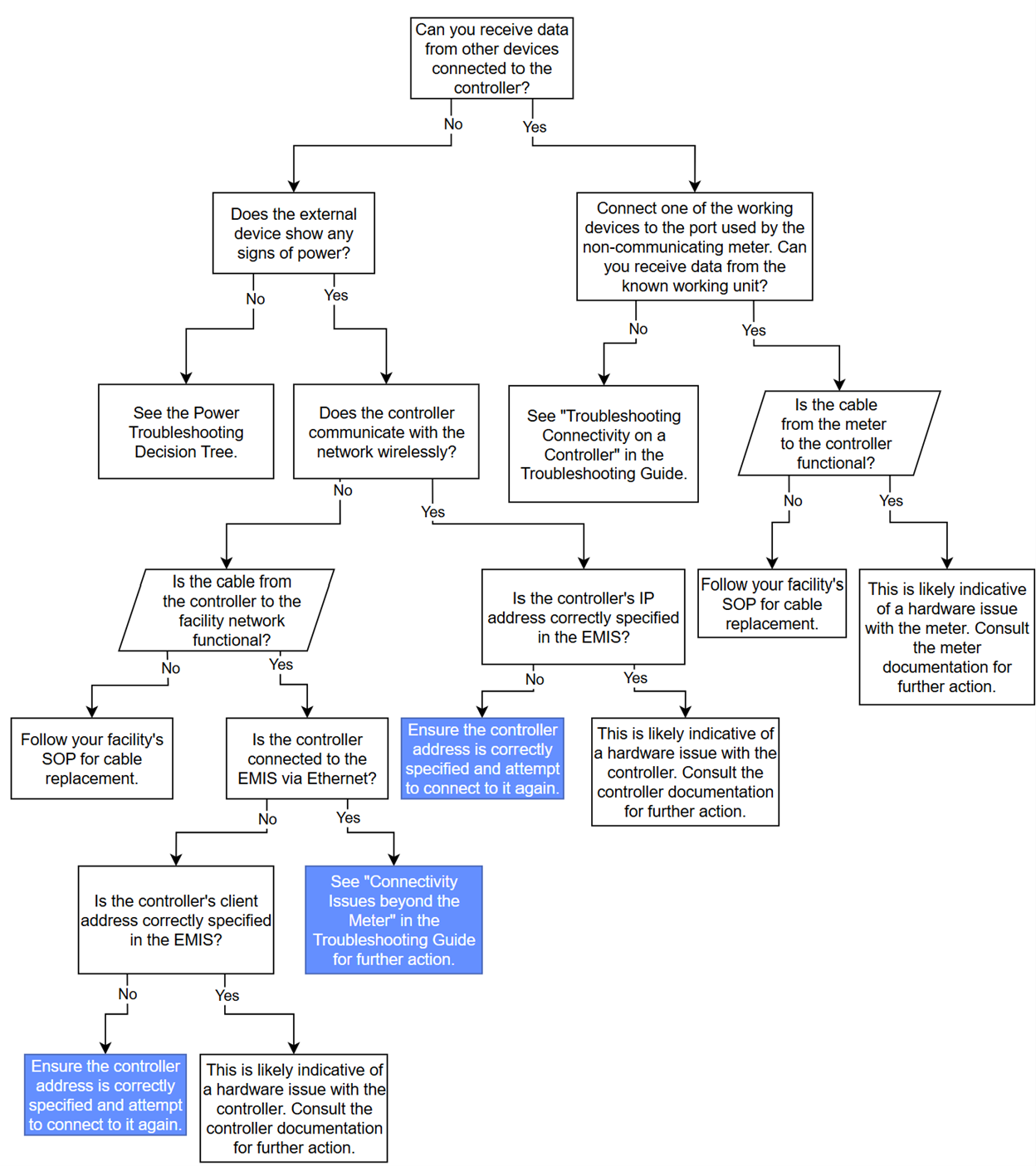
Network troubleshooting guide 3 of 3

PNNL

  • Get in Touch
    • Contact
    • Careers
    • Doing Business
    • Environmental Reports
    • Security & Privacy
    • Vulnerability Disclosure Policy
    • Notice to Applicants
  • Research
    • Scientific Discovery
    • Energy Resiliency
    • National Security
Subscribe to PNNL News
Department of Energy Logo Battelle Logo
Pacific Northwest National Laboratory (PNNL) is managed and operated by Battelle for the Department of Energy
  • YouTube
  • Facebook
  • X (formerly Twitter)
  • Instagram
  • LinkedIn